// ARS TECHNICA — MOBILE & WEB
Google's anti-nausea Motion Assist dots finally rolling out on Android
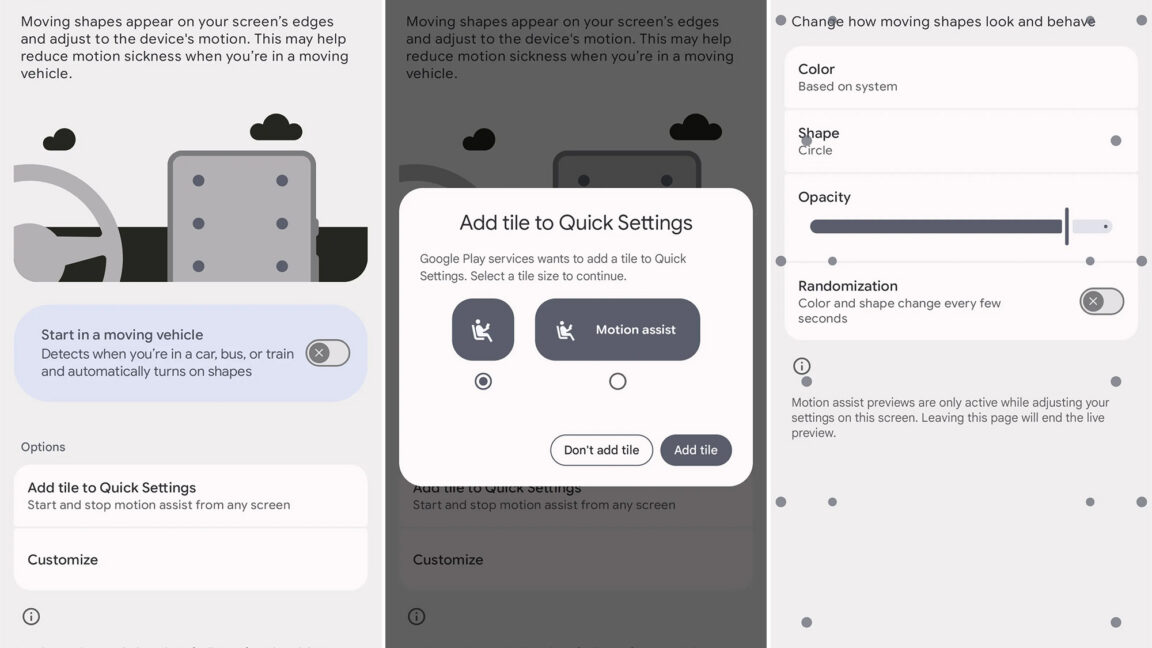
It’s currently only appearing on Pixels running Android 17.
Some people are cursed with motion sickness, which can make it impossible to read or use a phone in a moving vehicle without suffering waves of nausea. There’s a surprisingly simple trick that can make smartphones usable in such situations. Apple deployed it on the iPhone a couple of years ago, and now Google’s own version is finally coming (slowly) to Android.
Motion sickness is caused by a disagreement between what your inner ear senses and what your eyes see. If you’re looking at a book or a screen while in a car, the sensory mismatch can lead to a pretty unpleasant time. As part of iOS 18 in 2024, Apple released a feature called Motion Cues that places a network of moving dots on the screen to alleviate motion sickness, and it seems to work surprisingly well. Google’s version is similar, but it’s called Motion Assist.
Google began testing Motion Assist back in 2024, but it never expanded beyond an internal test until now. Android Authority reports Motion Assist is appearing on Pixel phones running Android 17, but there’s no app or update you can install to get the feature—it’s being delivered by Play Services as part of a staged rollout.
When activated, Motion Assist adds small dots around the edges of your phone screen over top of the content. It plugs into your phone’s accelerometer and gyroscope, allowing the dots to move in concert with the motion of the vehicle; they travel down the screen while the vehicle is moving forward, to the left when turning right, and so on. They basically mimic the way objects in the real world would move through your vision if you weren’t glued to the screen. Here’s how Apple’s version works.
People who have used Apple’s anti-nausea dots have reported that the feature works wonders in reducing motion sickness. So there’s every reason to expect Google’s version will be similarly effective. Motion Assist can be activated manually as needed from the menu or using a quick settings tile. You can also let your phone turn it on automatically when it detects you’re in a moving vehicle. Google’s version of this feature also includes a few customization options, letting you change the shape, size, color, and opacity of the anti-nausea dots.
If Motion Assist is available on your phone, you’ll find it in the Google services settings, usually nested one level below the main settings: Settings > Your profile > All services. Motion Assist will be under the Personal & Device section near the bottom.
So far, Motion Assist has only appeared on Pixel phones running Android 17. The feature was obviously tested on earlier versions of Android, but it’s unclear if the final version will be exclusive to either Google’s phones or the latest version of Android. We’ve reached out to Google for clarification on this point.