// TOM'S HARDWARE US — HARDWARE & GADGET
Framework Laptop 12 (Wildcat Lake) review: Growing up amid an unprecedented shortage
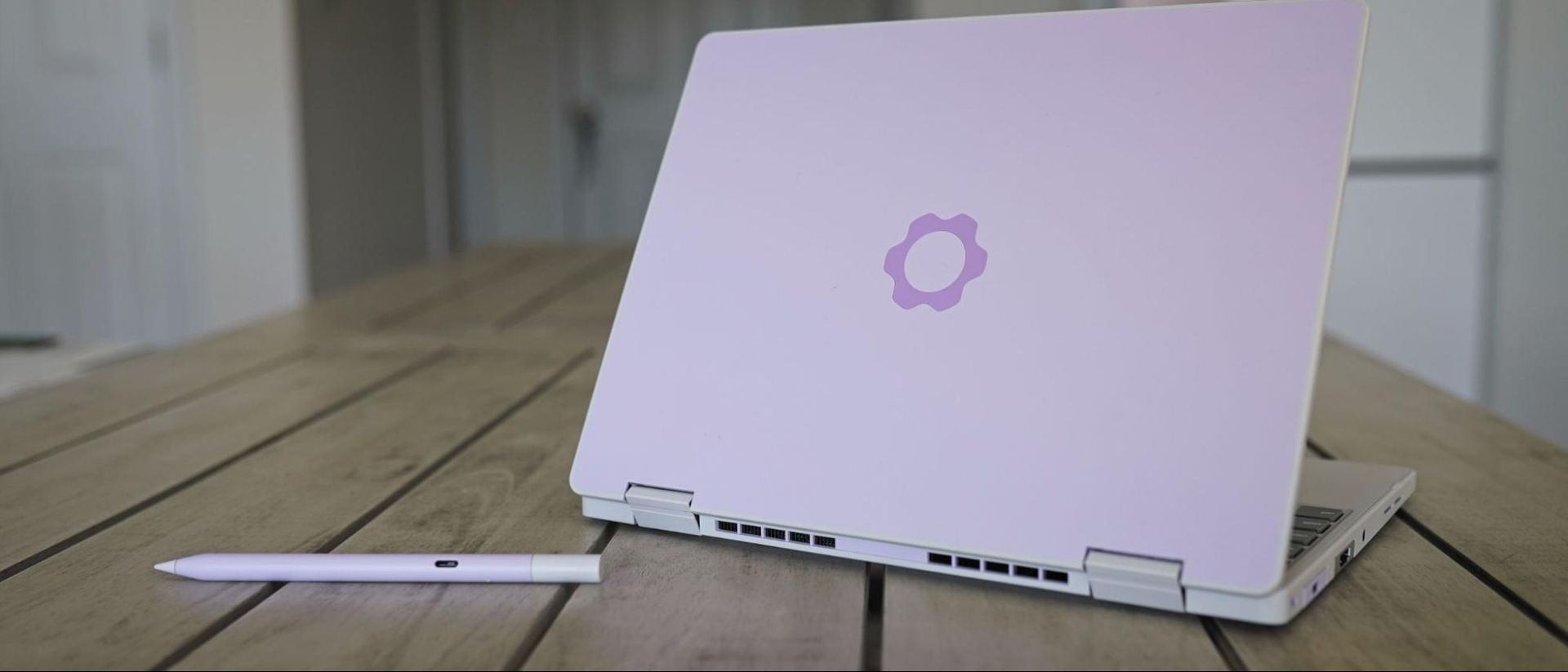
The Framework Laptop 12 is a highly portable and repairable budget laptop, but it’s lacking features compared to the competition and lands at a higher price — unless you’re willing to supply your own RAM and SSD.
Why you can trust Tom's Hardware
Our expert reviewers spend hours testing and comparing products and services so you can choose the best for you. Find out more about how we test.
When Framework introduced the Laptop 12 early last year, it offered an affordable, repairable, and relatively capable laptop, especially aimed at students. Between a 2-in-1 convertible design, a touchscreen with an optional stylus, the slim frame, and a $699 starting price, it was an attractive option. The updated Framework Laptop 12 targets that same group, though it’s entering a very different market, with some of the biggest brands gunning to become frontrunners for the best college laptops. Framework still makes one of the best laptops on the market with the Laptop 13 Pro, but the entry-level market is a different beast, especially today.
Apple’s MacBook Neo has prompted a wave of more affordable Windows laptops, with Intel’s Wildcat Lake taking center stage in devices like Dell’s refreshed XPS 13. The Framework Laptop 12 provides competitive performance with these devices, though at a higher price point and with less premium amenities.
The 1080p, 60Hz display is a reminder that the otherwise-premium-feeling Laptop 12 is a budget device, and although the Laptop 12 starts at just $549 without memory or storage, it ends up around $200 to $300 more expensive than the competition when fully configured. The laptop begs a question: how much are you willing to pay for repairability?
Like Framework’s previous Laptop 12 with 13th-Gen Intel CPUs, the updated version with Wildcat Lake comes in a variety of colors: Black, Gray, Lavender, Bubblegum, and Sage. Our review unit, as you can see, is the Lavender variation. At the time of writing, you need to purchase the DIY version to choose your color; the prebuilt version is currently only available in Sage.
Unlike Framework’s more expensive Laptop 13 Pro, you don’t have the option to customize the color of the bezels, and only Gray and Lavender keyboard options are available now (though, presumably, Framework will expand these options). USB-A and USB-C modules come in a wide array of colors, as well, though other expansion modules are limited to a standard silver color. Framework also offers an optional $59 stylus, matching the color options available for the Laptop 12.
The Framework Laptop 12 is a highly portable device, though perhaps not as thin and light as you’d expect out of a 12-inch laptop. It's 0.72 inches thick and clocks in at 2.8 pounds, which is thin enough and light enough, though not on the level of its enclosed competitors. The MacBook Neo weighs about the same at 2.7 pounds, but it’s covered in aluminum and it’s 0.5 inches thick. The XPS 13 with Wildcat Lake is much lighter at 2.2 pounds, thinner at 0.5 inches, and also finished with aluminum.
Considering the bulk of modularity, the fact that Framework managed to get the weight and thickness of the Laptop 12 close to closed-door competitors is remarkable. However, the fact remains that you’re often paying a premium with the Framework Laptop 12 compared to the Neo and XPS 13 and, in both cases, getting a laptop that feels less like a premium ultrabook out of the box.
Get Tom's Hardware's best news and in-depth reviews, straight to your inbox.